Homelab
A self-hosted, segmented network with its own monitoring, serving the website you are reading right now. It runs on one refurbished PC and a single managed switch.
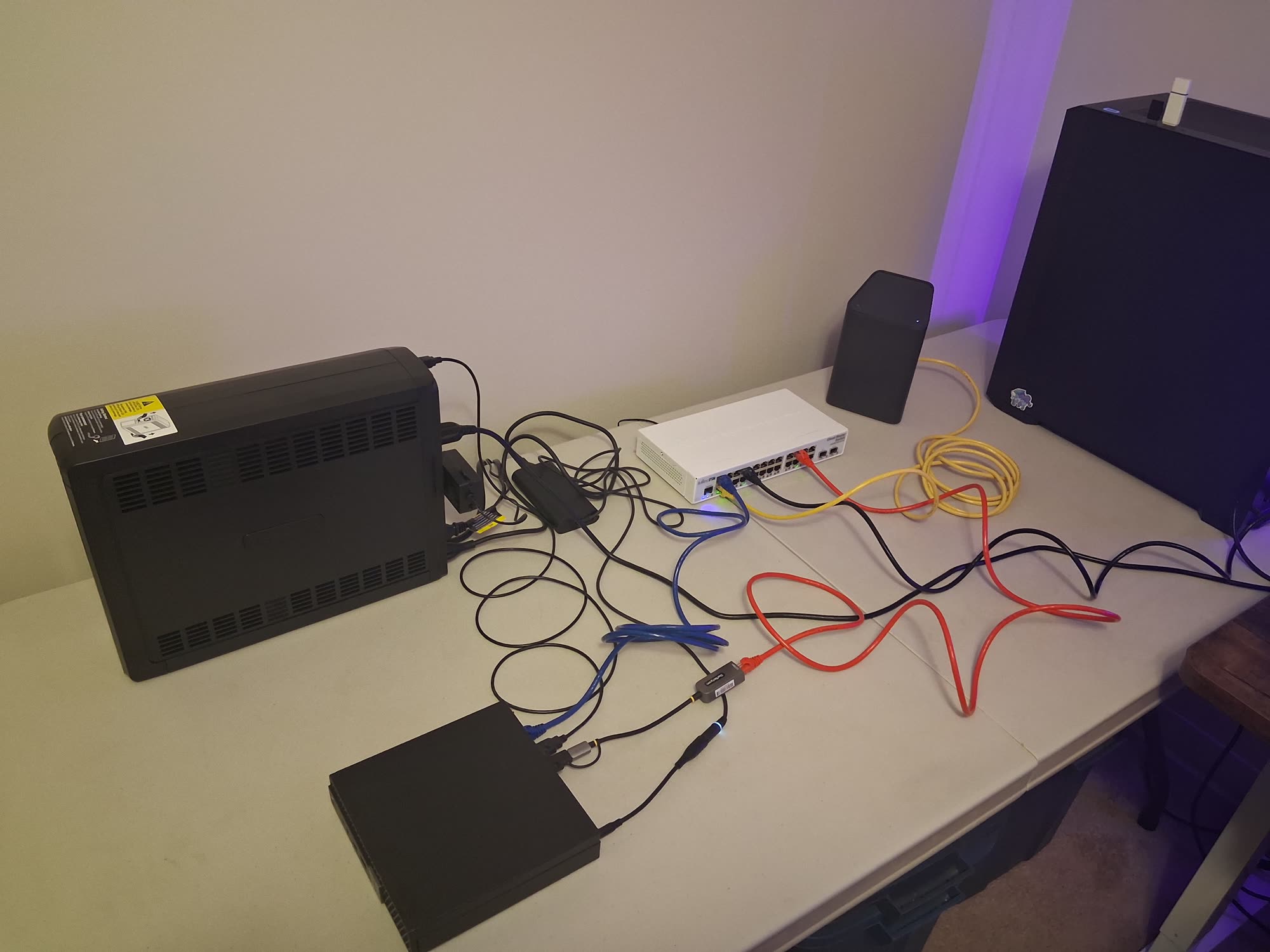
Click or tap a device for its specifications. Everything is listed below as well.
- Internet uplink — the only cable touching the public network
- Trunk — every segment, over one wire
- Desktop access
- Traffic mirror — receive-only, and the one cable whose removal produces no symptom
ISP modem / router
ISP gateway providing internet for the lab
| Role | ISP gateway |
|---|---|
| Note | Provides the internet connection only |
The lab sits behind it, so traffic is translated twice. It stays that way until the lab has its own access point, because putting this device into bridge mode turns its Wi-Fi off and the house still depends on it.
Managed switch
MikroTik CRS326 — switch, router and firewall
| Model | MikroTik CRS326-24G-2S+IN |
|---|---|
| Ports | 24 x 1 GbE, 2 x 10G SFP+ |
| Runs | RouterOS — switching, routing and firewall |
| Cooling | Fanless |
It already does the routing, address translation and firewalling for the lab; the ISP gateway upstream only provides the internet connection. Its ports are divided between the internet link, a single trunk to the hypervisor, the desktop, and a mirror port feeding the sensor. Everything downstream depends on it, which is why it has a written recovery procedure.
Hypervisor
Proxmox hypervisor on a Dell Micro PC
| Model | Dell OptiPlex 7070 Micro |
|---|---|
| CPU | Intel i5-8500T, 6 cores |
| Memory | 32 GB DDR4 |
| Storage | 512 GB NVMe |
| Runs | Proxmox VE |
Runs every container and virtual machine in the lab. Its guests sit in five different isolated networks, all carried over one physical cable to the switch, with each guest tagged into its own segment. Containers are used where a workload only writes files; anything that parses untrusted input gets a full virtual machine instead, so it does not share the host's kernel.
Desktop
Personal computer
Used to reach the hypervisor console and the SIEM dashboard over HTTPS, and every other machine through the jump host. It is deliberately kept out of the management segment: it is the device most likely to be compromised, and that segment can reach every administrative interface in the lab. It gets a few narrow exceptions instead, each scoped to one destination.
UPS
CyberPower CP1500PFCLCD - 1500 VA / 1000 W
| Model | CyberPower CP1500PFCLCD |
|---|---|
| Capacity | 1500 VA / 1000 W |
| Output | Pure sine wave |
| Management | USB, monitored by the hypervisor |
Surge protection, plus enough battery for the hypervisor to shut its guests down cleanly rather than losing power mid-write. It reports its state over USB, so a long outage triggers a coordinated shutdown instead of a crash. The switch and the ISP gateway share the battery outlets, since runtime on the hypervisor is worth nothing without a network.
Capture interface
Receives a mirrored copy of internet traffic
| Model | Realtek RTL8156B |
|---|---|
| Speed | 2.5 GbE over USB |
| Role | Receive-only capture interface |
The switch copies every frame crossing the internet link to a spare port, and this interface receives them. It is receive-only and has no address, so the sensor behind it can never affect the traffic it watches — and a failure here breaks nothing. It only sees traffic leaving or entering the network, not machines talking to each other inside it. USB rather than a card because the hypervisor has no expansion slot.
Why I built it
I worked as a monitoring station dispatcher for over a year, so I have seen alert systems that were overtuned, undertuned, and everything in between. This lab is my chance to work the other side of that — building the systems and tuning the alerts rather than only reacting to them.
What it taught me
Always prove that a configuration does what it claims. I had encrypted upstream DNS configured and later found every query still leaving in plaintext, because the setting I had used was never in the resolution path. After fixing it I added a firewall rule that logs any attempt to reach an external resolver, so the same failure would announce itself next time.
A control that only exists in software cannot see traffic that bypasses software. Connecting to the switch by MAC address works at layer 2, so none of the firewall's rules apply to it. The same principle rules out hardware-offloaded routing here: it would be faster, and it would move traffic past the CPU where the firewall actually runs.
Noise evicts signal. My firewall's default-deny rule logs what it drops, rate limited so it cannot flood the collector, but one chatty application on my desktop produced around 15,000 broadcast lines a day and consumed that budget — so a genuinely interesting dropped packet might never have been recorded.
Correlating events needs agreement on time and on format, and those are separate problems. One host was left on local time, so its events were labelled seven hours off while its clock was perfectly accurate. NTP fixed accuracy, using UTC everywhere fixed the labelling, and moving to a log format that carries its own timezone fixed the part where the receiver had been guessing.
Segments
Infrastructure
The physical kit everything else depends on — power, switching, and the machine the guests run on
Management
Administrative access to the lab. Reaches every segment, and nothing reaches it uninvited
Trusted
Everyday personal devices — internet access, plus a few narrow exceptions into management
Public-facing
Anything exposed to the internet, isolated on the assumption it will eventually be compromised
Monitoring
Collects, inspects and stores evidence — kept apart from both what it watches and what produces it
Isolated
Deliberately untrusted. Reaches the internet and nothing else in the lab, in either direction
Hardware
ISP modem / router Infrastructure
ISP gateway providing internet for the lab
The lab sits behind it, so traffic is translated twice. It stays that way until the lab has its own access point, because putting this device into bridge mode turns its Wi-Fi off and the house still depends on it.
Managed switch Infrastructure
MikroTik CRS326 — switch, router and firewall
It already does the routing, address translation and firewalling for the lab; the ISP gateway upstream only provides the internet connection. Its ports are divided between the internet link, a single trunk to the hypervisor, the desktop, and a mirror port feeding the sensor. Everything downstream depends on it, which is why it has a written recovery procedure.
Hypervisor Infrastructure
Proxmox hypervisor on a Dell Micro PC
Runs every container and virtual machine in the lab. Its guests sit in five different isolated networks, all carried over one physical cable to the switch, with each guest tagged into its own segment. Containers are used where a workload only writes files; anything that parses untrusted input gets a full virtual machine instead, so it does not share the host's kernel.
Desktop Trusted
Personal computer
Used to reach the hypervisor console and the SIEM dashboard over HTTPS, and every other machine through the jump host. It is deliberately kept out of the management segment: it is the device most likely to be compromised, and that segment can reach every administrative interface in the lab. It gets a few narrow exceptions instead, each scoped to one destination.
UPS Infrastructure
CyberPower CP1500PFCLCD - 1500 VA / 1000 W
Surge protection, plus enough battery for the hypervisor to shut its guests down cleanly rather than losing power mid-write. It reports its state over USB, so a long outage triggers a coordinated shutdown instead of a crash. The switch and the ISP gateway share the battery outlets, since runtime on the hypervisor is worth nothing without a network.
Capture interface Monitoring
Receives a mirrored copy of internet traffic
The switch copies every frame crossing the internet link to a spare port, and this interface receives them. It is receive-only and has no address, so the sensor behind it can never affect the traffic it watches — and a failure here breaks nothing. It only sees traffic leaving or entering the network, not machines talking to each other inside it. USB rather than a card because the hypervisor has no expansion slot.
Virtual machines and containers
Website Public-facing
Personal website container - you are here :)
Published through a Cloudflare Tunnel, so there are no open inbound ports and nothing on the perimeter to attack — the connection is made outbound from the container. It sits in an isolated public-facing segment and can reach the internet plus one narrow path to the log collector, and nothing else internal. It is built on the assumption that it will eventually be compromised, so the interesting question is what an attacker gets afterwards: internet access and a log port.
Sandbox VM Isolated
Isolated environment for practising security work
For practising on TryHackMe over their VPN, which is free where the hosted attack machines are time-limited. It runs offensive tooling and connects into deliberately vulnerable networks, which makes it the least trusted device here — so it has no path to anything internal and reaches only the internet. It also uses an external name resolver rather than the lab's own, because its lookups are supposed to be hostile and would pollute a feed meant to be clean.
IDS sensor Monitoring
Suricata network sensor on its own virtual machine
Reads the mirrored copy of internet traffic and matches it against community threat rules, shipping alerts to the log collector while the full packet record stays local — sending it would have quietly filled the collector's disk. Rules update daily on a timer that fails loudly, because a sensor with stale rules gives the feeling of coverage without the coverage. It is a virtual machine rather than a container because it is the one host whose job is to parse attacker-controlled data.
Log collector Monitoring
Receives and archives logs from every device
Every device ships its logs here within a second of writing them, so a record exists off the machine that produced it. Senders arrive on separate trusted and untrusted channels, enforced by firewall rules, and each message is filed by the address the connection actually came from rather than the hostname it claims — impersonation still happens, it just cannot hide. The logs are kept in two forms: a long-term archive for investigations, and a separate feed shaped for the SIEM to parse. It was the first thing built in this phase, because a detection whose evidence lives on the compromised host is not evidence.
SIEM Monitoring
Wazuh — decodes events, matches rules, raises alerts
Reads the feed the collector prepares and turns raw device logs into named fields, including a custom decoder for the switch, which had to be reconfigured to emit a structured format first. Custom rules cover firewall drops, the switch originating more connections than normal, and any configuration change — with who made it, how, and from where. It keeps thirty days indexed against a year in the archive, because the dashboard answers questions about right now and the archive answers questions about the past.
Jump host Management
Single SSH chokepoint into the rest of the lab
Reaching another segment used to mean hopping through the hypervisor, which can reach everything — so one compromise would have taken the jump host, the hypervisor, and every machine on it. This container has the same reach and a fraction of the surface: SSH and nothing else, no hypervisor interface, no virtual disks. Sessions pass through it without it holding any keys, and its login records leave the box immediately, because a login record stored on the machine being logged into is evidence the attacker controls.